


The reputation you gain online can help make – or break – the success of your hotel, especially when you’re reviewed on a popular, widely-seen platform like Google.
Responding to guest reviews enables you to take more control of your reputation and represent your brand positively, while at the same time building trust with consumers and increasing customer retention.
This guide offers a few simple but effective tips for managing and responding to hotel reviews on Google and other platforms, including both positive and negative hotel reviews.
It also provides examples of ways to respond, lists five must-watch hotel review platforms besides Google, and answers some of your most frequently asked questions about managing Google reviews for hotels. If you are a business owner, check out this AI tools for small businesses.
Google reviews hotels: the A to Z Guide for managers
To manage your Google hotel reviews effectively, there are four steps you must take:
- Create a Google Maps listing for your hotel. Google’s Support Center provides detailed, step-by-step instructions for listing hotels on Google. The first step is to register for a Google Business Profile, following either the procedure for registering multiple profiles or a single profile, depending on your needs. Once you claim and verify the Business Profile, you can start managing your hotel’s information on Google, like information about hotel room availability, amenities, and more.
- Get as many hotel reviews as possible. Research shows that 46% of consumers trust online reviews as much as friends or family. The more good reviews your business receives, the more potential customers will be willing to try your hotel. In addition to attracting future guests by instilling trust in your brand, getting more positive reviews can boost your local search rankings.
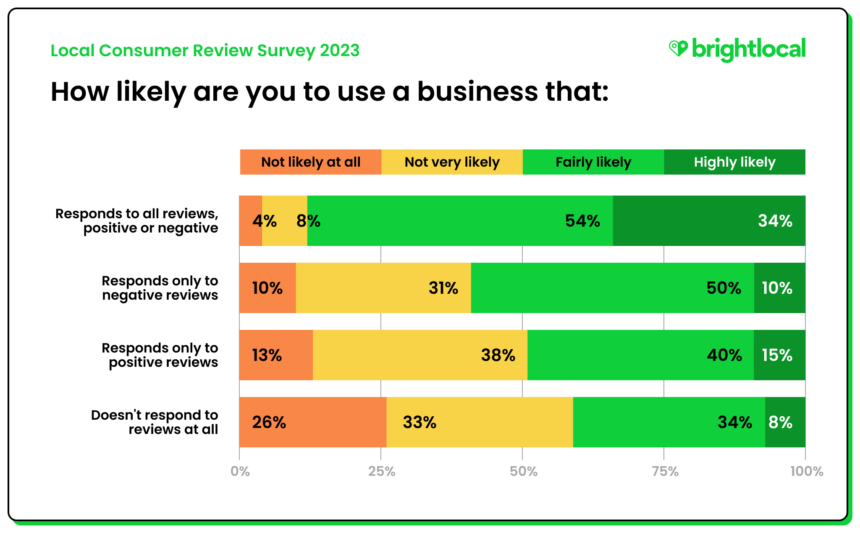
- Respond to every Google review. It’s essential to reply to all of your hotel’s Google reviews, even if they’re negative reviews or 1-star ratings. You should also respond to reviews you receive on other platforms, like Yelp and Tripadvisor, which we’ve featured some examples of below. Taking this step is important because, as research by Brightlocal shows, consumers are more likely to choose businesses that respond to all reviews – not just those that are positive or negative.
- Use positive reviews to promote your hotel and attract potential guests. Data shows that user-generated content (UGC), such as an authentic customer review, is more highly trusted than advertisements or paid influencers. Put UGC to work for your hotel by featuring positive reviews prominently on your website and/or social media, like your hotel’s Facebook page.
How to reply to good and bad Google hotel reviews
When your hotel is reviewed on Google, it’s crucial to respond publicly, promptly, and professionally.
Here are five tips and best practices for responding to reviews of hotels on Google, plus examples of how to implement them.
Tip #1: Thank the guest for their Google review.
Express gratitude for all Google hotel reviews, even if they’re negative.
- “Thanks for taking a moment to share your comments with our team!”
- “Thank you for rating and reviewing [Hotel Name].”
Tip #2: Address the reviewer’s main points.
Identify the reviewer’s main points and address them in your response. Don’t ignore key aspects of the review simply because they’re negative.
- “It was our pleasure to provide you with a smooth booking process and a comfortable, quiet stay.”
- “We understand your frustration and sincerely apologize for the difficulty you initially experienced connecting to our free guest wi-fi.”
Tip #3: Personalize your responses to Google hotel reviews.
Reference specific details from the review, whether positive or negative. Other personalization strategies include using the guest’s name, referencing the hotel’s name, and/or the geographic location.
- “We’re thrilled to hear that your family had such a fun time in our heated swimming pool, [Reviewer Name]!”
- “Our guests’ comfort and safety is our highest priority, and we’ve escalated your concerns about pests for immediate review by the appropriate staff members.”
Tip #4: Emphasize the positive quality of your hotel.
Review responses function like hotel ads, giving you a space to showcase the best features of your brand. When replying to a review online, take the opportunity to incorporate a positive reference to your hotel.
- “At [Hotel Name], we take pride in providing a comfortable, relaxing experience for our guests.”
- “From our convenient location in downtown L.A. to the dazzling skyline views from our rooftop bar, [Hotel Name] is proud to offer our guests a 5-star travel experience.”
Tip #5: Encourage satisfied guests to return, and support dissatisfied guests.
Welcome satisfied guests to come back, and provide dissatisfied guests with a way to contact your team directly for follow-up support and assistance.
- “Visit us again next time you’re in the area, and have a safe and pleasant return trip!”
- “We encourage you to contact our support team directly by calling [phone number] or emailing [email address], and we’ll be happy to help you get this resolved swiftly.”
5 best review sites for hotels (besides Google) in 2024
Google may be the top platform for reviews, but it isn’t the only platform your hotel needs to monitor. Here are five more review sites to pay attention to in 2024:
- Tripadvisor
- Hotels.com
- Booking.com
- Expedia
- Trivago
1. Tripadvisor
Tripadvisor is a website and mobile app with detailed information about hotels, vacation rentals, and restaurants, along with tools to plan a trip and book accommodations.
By entering their travel dates, users can compare prices, search for specific amenities, and of course, post or browse hotel reviews. In addition to checking individual reviews, users can also read an AI-generated review summary.


Boasting “over a billion reviews and contributions,” it’s no surprise that Tripadvisor currently ranks as